
How it works
You get one chance to not send it.
Once a message lands, it’s on the record for good, and your co-parent decides what it meant. CoParentPro is built around the ten seconds before you hit Send. Here’s what happens in those ten seconds, why it’s built that way, and what it does for a parent who is tired of every text turning into a fight.
The moments it’s built for
You know these moments. So does the app.
Late again.
They’re 40 minutes late and you’re typing “I’m taking you to court.” The strip flags it before you finish the sentence.
You can still send it. Now it’s a choice, not a reflex.
The money text.
You’ve asked about the dentist bill three times. Draft four starts with “You never…”. The app names the pattern (blaming) and shows a version that asks for the money without the jab.
Because the point is getting paid, not getting even.
11:47 pm.
The message that feels great at midnight is the one that gets read aloud in mediation. On a red draft, Hold until morning parks it and reminds you at 8 AM.
If it’s true, it’ll still be true in the morning.
They twist everything.
Your calm message is evidence too. Every message is locked the moment it’s sent, timestamped, and exportable with a verification code.
Sounding reasonable stops being a favor to them and starts being a record for you.
Why it names the pattern
A red light tells you to stop. A name tells you what to stop doing.
Most tone tools flag “negative words” and leave you guessing. Ours tells you which of 15 patterns you just wrote, in one plain sentence: “This may read as blaming.” “This may read as dismissing their experience.” The labels are built on John Gottman’s research into the four patterns that predict a relationship falling apart: criticism, contempt, defensiveness and stonewalling. You can’t leave a co-parenting relationship, so those patterns just keep doing damage.
What that does for you: after you’ve seen “This may read as controlling” a few times, you start catching it yourself, before the app does. That’s the whole goal. The app is training wheels, not a chaperone.
- Accusations
“This may read as blaming.”
- Generalizations
“This may read as an overgeneralization.”
- Demands
“This may read as demanding.”
- Dismissiveness
“This may read as dismissive.”
- Heated language
“This may read as heated.”
- Passive-aggressive
“This may read as passive-aggressive.”
- Mind reading
“This may read as assuming their intent.”
- Catastrophizing
“This may read as catastrophizing.”
- Insults
“This may read as insulting.”
Safety floor - Threats
“This may read as threatening.”
Safety floor - Parental alienation
“This may read as undermining the other parent.”
Safety floor - Gaslighting
“This may read as dismissing their experience.”
Safety floor - Coercive control
“This may read as controlling.”
Safety floor - Emotional blackmail
“This may read as pressuring.”
Safety floor - Boundary violations
“This may read as overstepping.”
Safety floor
Safety floor means a clear hit in that category is decided on your phone, and nothing that runs afterward, including our AI, can talk it down. A safety net that can be argued out of a threat isn’t a safety net.
While you type
A check that’s instant, private, and honest
As you type, your phone checks the draft against 156 hand-written patterns. No internet, no AI, nothing leaves the phone. It works the same on the free plan, in Private Mode, and with no signal.
- It only speaks up for strong hits: one line per pattern, plus one concrete suggestion.
- It never blocks and never rewrites. It shows you what you wrote and lets you decide.
- Patterns have context rules, so “I’ll call my lawyer about the paperwork” passes and “One more late payment and I’ll call my lawyer” doesn’t.
Why instant and local matters: a warning that arrives after you’ve committed is a scolding. One that arrives mid-sentence is a nudge. And because it never phones home, you can be as honest in the draft as you need to be to get to the version you’ll actually send.
This may read as threatening.
Avoid making threats, even implicitly.
Real behavior: the phrase “I’m taking you to court” was flagged on the phone before the sentence was finished. You can still send it. Now it’s a choice.
When you tap Send
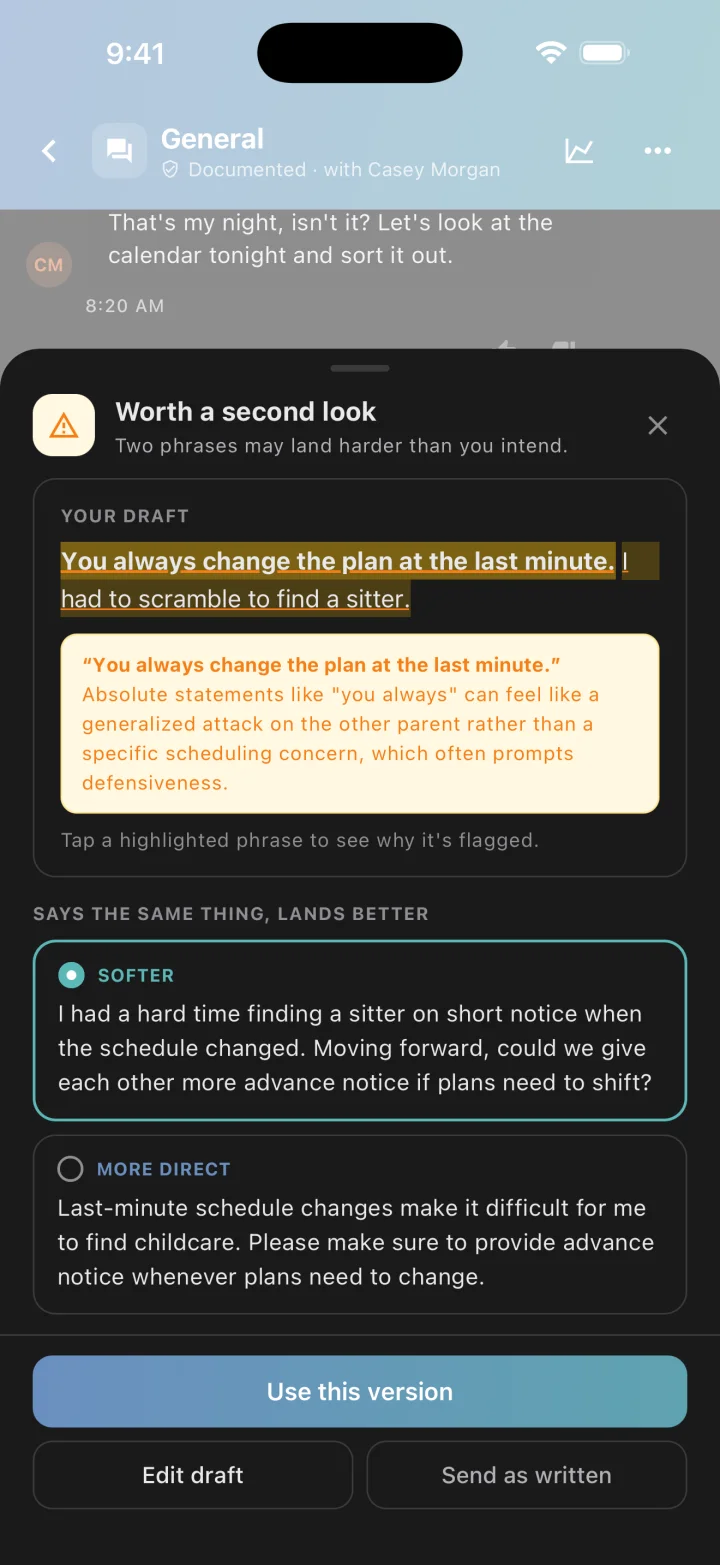
A second look, and two better ways to say it
Tapping Send or Review runs a deeper check. Most of it happens on your phone. The one step that uses our cloud AI is fenced in on every side.
- 1Your phone
Reads the whole draft
Tone, emotion, how much “you” versus “I”, whether a request sounds like an order. The same 156 patterns, now weighed in context.
- 2Your phone
Sets the safety floor
Threats, insults, alienation, gaslighting, control, blackmail and boundary violations are decided here. The AI can add a warning. It can never remove one.
- 3Cloud AI
Reads it, if it needs to
Only the draft, the patterns your phone found, and the one message you’re replying to. Never the thread. Never in Private Mode.
- 4Cloud AI
Explains and rewrites
Every flagged phrase quoted word for word with a plain reason, plus two rewrites: Softer and More direct. Anything it can’t quote from your draft is thrown away.
- 5You
Choose
Use a rewrite, edit, send as written, or hold until morning. If the cloud is slow or you’re offline, your phone’s result stands and you can still send.
Why two rewrites, not one
A tone tool that only knows how to soften teaches you to fold. In a high-conflict dynamic, folding is how boundaries disappear. So you get Softer, which keeps your need but leads with “I”, and More direct, which states the need and the expectation without the jab. Hold the line without handing them a quote.
Why it reads the reply, not the thread
Snapping and snapping back are different, so the AI sees the one message you’re answering. It never sees the rest of the thread, and an earlier ugly message from them never earns yours a pass. Which is exactly how a mediator will read it: your words, not your reasons.
The review sheet
Every flagged phrase is quoted word for word, with a plain reason. Tap one to read it. Below that, the two rewrites. Then your call: use a rewrite, edit the draft, send it as written, or on a red draft, Hold until morning, which parks it and reminds you at 8 AM.
Why the hold exists: the message that feels great at midnight is the one that gets read aloud in mediation. If it’s true, it’ll still be true in the morning.
Free plan: drafts your phone flags stay on the phone with the rule’s explanation, and drafts it doesn’t flag get up to 20 AI checks a day. Premium adds the AI’s explanations and rewrites on every flagged draft.
Your privacy
What leaves your phone, and what never does
For some parents the idea of an AI reading their drafts is a dealbreaker, and they’re often the ones who need the safety net most. So the safety net doesn’t depend on the cloud, and you can switch the cloud off.
Sent to the cloud AI
- The draft, as written
- The patterns your phone already found
- How many attachments and what kind, never the files
- The one message you’re replying to, only for a direct reply
Never sent
- The rest of the conversation, ever
- Drafts you deleted or edited before sending
- Your Insights, or anything about your co-parent
- Anything at all in Private Mode, offline, or in a thread that isn’t with your co-parent
Private Mode
One switch in Settings keeps the subtle analysis on your phone. Strong warnings still appear; the AI’s explanations and rewrites don’t. And four things stay on your phone whether or not you flip it:
- Threads with anyone who isn’t your co-parent
- Anything a family member writes
- Notes on schedule-change requests
- And our server refuses cloud analysis for family accounts even if an app asks
The record
What your co-parent can and can’t see
Your drafts and the rewrites you were offered are never saved. Anywhere. What you actually send carries its color, and yes, your co-parent can see that color, the same way you can see theirs.
Why that’s a feature: in a high-conflict dynamic, your calm message is evidence too. Every message is locked the moment it’s sent, timestamped, and exportable. Sounding reasonable stops being a favor to them and starts being a record for you.
| Item | Saved? | They see |
|---|---|---|
| Your draft while you type | Never | Nothing |
| Rewrites you were offered, and whether you used one | Never | Nothing |
| The sent message’s color and flagged phrases | Yes, with that message | The color, and can open the analysis |
| Your Insights | Yes, under your account only | Nothing |
| Your thumbs-down on an analysis | Yes, under your account only | Nothing |
Straight talk
Why you can trust it, and where you shouldn’t
Every change to the app has to pass a set of hand-labeled test messages before it ships: real co-parenting situations, including the ones designed to trick it, like a question that isn’t a demand or a receipt that isn’t blackmail.
- hand-written patterns in 15 named categories
- 156
- hand-written patterns in 15 named categories
- hand-labeled test messages it must get right before a change ships
- 160
- hand-labeled test messages it must get right before a change ships
- “same message, different punctuation” checks that must give the same answer
- 25
- “same message, different punctuation” checks that must give the same answer
- drafts or rewrites saved, anywhere
- 0
- drafts or rewrites saved, anywhere
What we don’t claim
- No single accuracy number. It would hide the failures that matter: a missed threat and a wrongly flagged school note are not the same mistake.
- It’s guidance, not judgment. It will sometimes flag something you meant kindly and miss something you didn’t. That’s why it explains itself, never blocks, and always lets you send as written.
- The AI is a third-party model we don’t train. We fence it in: a fixed answer format, a quote-it-or-drop-it rule, the safety floor, and context rules we wrote ourselves.
Compared
What other apps say about theirs, in their own words
We built CoParentPro because the tone checks we tried were a word list with a color. Rather than tell you that, here is what the best-known apps say about their own tone features on their own websites, read on September 5, 2026. Where a page doesn’t mention something, we say “not described”, not “not there”.
ToneMeter and Writing Assistant
OurFamilyWizard
- ToneMeter flags “statements that may be perceived as emotionally charged” with “red colored bars just below your message draft.” It is “an optional add-on to your OurFamilyWizard subscription.”
- Writing Assistant rewrites in “five tone options: considerate, casual, neutral, direct, or professional” on “the Essentials plan or above.”
Not described: named patterns beyond “emotionally charged”; a reason for each phrase; a rule limiting what the AI may change; a privacy switch; offline behavior.
Sentiment Scanner and Writing Assist
TalkingParents
- “Scan your message’s sentiment before sending it to understand how it may be received.”
- “Get rewrite suggestions using structured, proven communication methods.” Listed as a feature of the Ultimate plan.
Not described: what it detects; whether phrases are explained; where the analysis runs; a privacy switch.
Co-Parent Assist
AppClose
- “Reviews your draft messages in real time and offers optional suggestions to improve clarity, soften wording that may be perceived as escalatory, and maintain a more neutral tone.”
- Reviews for language that “may come across as accusatory, emotional, or confrontational.”
Not described: named patterns; a reason for each phrase; which plan includes it; where the analysis runs.
Hostility monitor
Custody X Change
- “If you type negative words into a message, the app will alert you so you can reassess.”
- “If you choose to send the hostile words anyway, they’ll be called out and bolded when either parent creates a message report.”
Not described: any explanation, rewrite, or reading of context. The mechanism described is negative words.
Fayr, 2houses and coParenter describe messaging with a record of past exchanges, and coParenter describes “language filters” plus human mediators on demand. None of their pages describes a tone analysis feature.
Six questions to ask any tone tool
Does it name the pattern, or just flash red?
15 named patterns, including coercive control, alienation, gaslighting and emotional blackmail.
Does it quote the phrase and say why?
Every flag names the exact words and gives a one-line reason. If the AI can’t quote your draft, its finding is dropped.
Can it help you be firm, not just nice?
Two rewrites: Softer and More direct. Boundaries survive.
Can the AI talk itself out of a threat?
No. Seven categories are decided on your phone, and the AI can only add to that.
Can you turn the cloud off and keep the safety net?
Yes. Private Mode, plus four things that never leave the phone regardless.
Does the other parent have to pay to get it?
No. The on-phone check and a daily allowance of AI checks are free for both parents.
OurFamilyWizard, ToneMeter, TalkingParents, AppClose, Co-Parent Assist, Custody X Change, Fayr, 2houses and coParenter are trademarks of their respective owners, who are not affiliated with CoParentPro. Quotations are from those companies’ public websites as read on September 5, 2026; features and plans change. If we’ve misquoted anyone, email support@braveheartinnovations.com and we’ll fix it.
For the technically curious
The numbers behind the page above, checked against the app on September 5, 2026.
- Pattern library
- 162 patterns: 156 warning across 15 categories, 6 constructive (used to recognize repair, never to warn)
- Strip timing
- 300 ms after the last keystroke; shows patterns at severity 0.7+ on a 0 to 1 scale, one per category
- Safety floor
- Insults, threats, parental alienation, gaslighting, coercive control, emotional blackmail, boundary violations at severity 0.8+; the rule score is a floor the model cannot lower
- Cloud model
- Google Gemini on Vertex AI, called through our own Cloud Function; fixed JSON answer format, temperature 0.2
- Time limit
- 9 seconds at Send, two attempts; then the on-phone result stands and you can send
- Quote rule
- Any flagged phrase that isn’t a word-for-word quote of the draft is discarded before you see it
- Rewrites
- Softer: keeps the need, leads with an I-statement and a collaborative ask. More direct: states the need and expectation without threats, sarcasm, insults or blame. Server-checked, 1 to 2,000 characters, never an echo, never stored
- Context rules
- Tit-for-tat only on a direct reply; escalation needs at least two rises across at least three analyzed messages; relational labels suppressed without a reply; a prior red never carries forward
- Free allowance
- Up to 20 cloud checks per day for drafts the phone didn’t flag, plus 3 lifetime full previews
- Private Mode
- Settings → General → Private Mode, off by default; result tagged rules-only, no allowance used, no Premium prompts in those threads
- Always on the phone
- Non-co-parent threads, family-member senders, schedule-change notes; the server rejects cloud analysis for family accounts
- Feedback
- Thumbs-down nudges color thresholds for that pair by at most 0.10 after at least five pieces of feedback, stored under your own account
- Test set
- 106 hand-labeled gold cases (10 of them ranges), 54 conversation cases including six false-positive traps, 25 invariance groups; run automatically on every change
- What isn’t published
- A single accuracy or F1 number. Launch was judged slice by slice
Free for both parents. The record, too.
Messaging and the on-phone check cost nothing, for either parent, forever. Premium adds the AI’s explanations and rewrites on every flagged draft, with a 14-day trial once you’re connected to your co-parent.